
Spotter: Helping Women Feel Confident in the gym
New to the gym? New to the city? Meet Spotter—a mobile app that helps women find trusted workout partners, connect with supportive fitness communities, and feel more confident stepping into the weight room.
Inspired by research showing that many women feel intimidated or unsafe in strength training environments, our team conducted interviews, field observations, and concept testing to transform these insights into a research-informed experience that helps women feel more welcomed, connected, and confident at the gym.

My role
Timeline
Team
Context
My Contributions

The background
More Women Are Embracing Strength Training
Strength training has become an important part of many women's lifestyles, offering physical and mental health benefits while building confidence and long-term well-being. As more women embrace strength training, creating welcoming and supportive gym environments has become more important than ever.
The Problem Space
But the Gym Doesn't Always Feel Welcoming
Despite the growing popularity of strength training, many women continue to experience intimidation, harassment, and uncertainty in gym environments.
Secondary research found that:
56.37%
Experienced harassment
2.68×
Higher likelihood of sexual harassment
92.31%
Incidents went unreported
These experiences discourage participation, reduce confidence, and prevent many women from fully engaging in strength training.
Our Approach
Design question

Design goals
1. Increase confidence in strength training environments.
2. Improve feelings of safety and comfort at the gym.
3. Foster positive social connections and support systems.
4. Make gym spaces and equipment easier to navigate.
5. Create an inclusive experience for users of varying fitness levels.
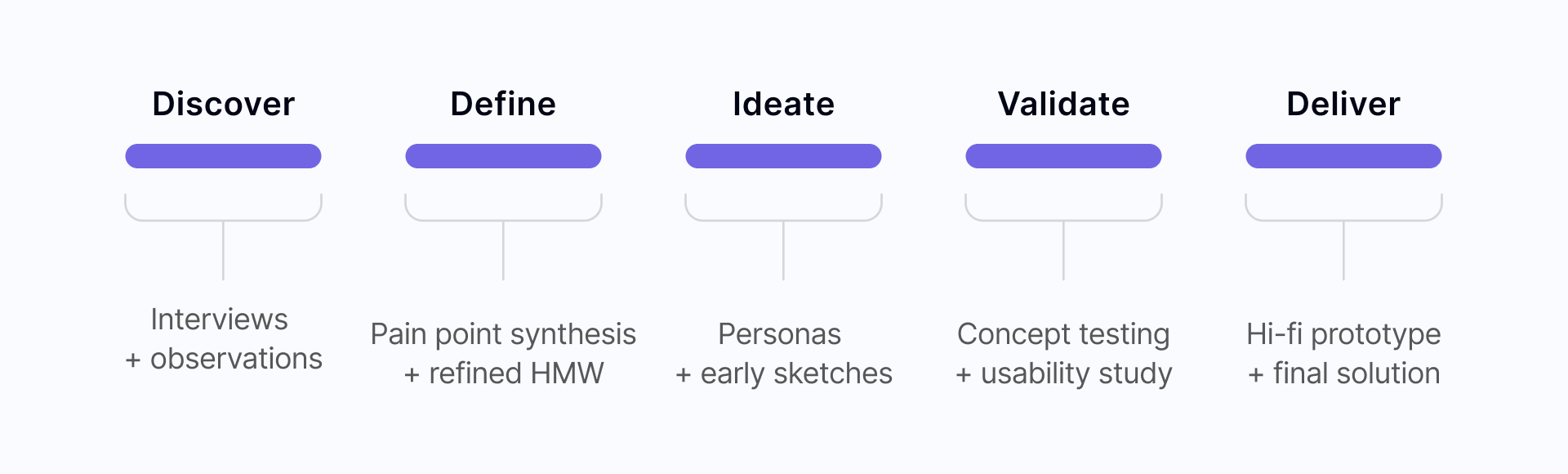
our design process
Understanding the user
user research Summary
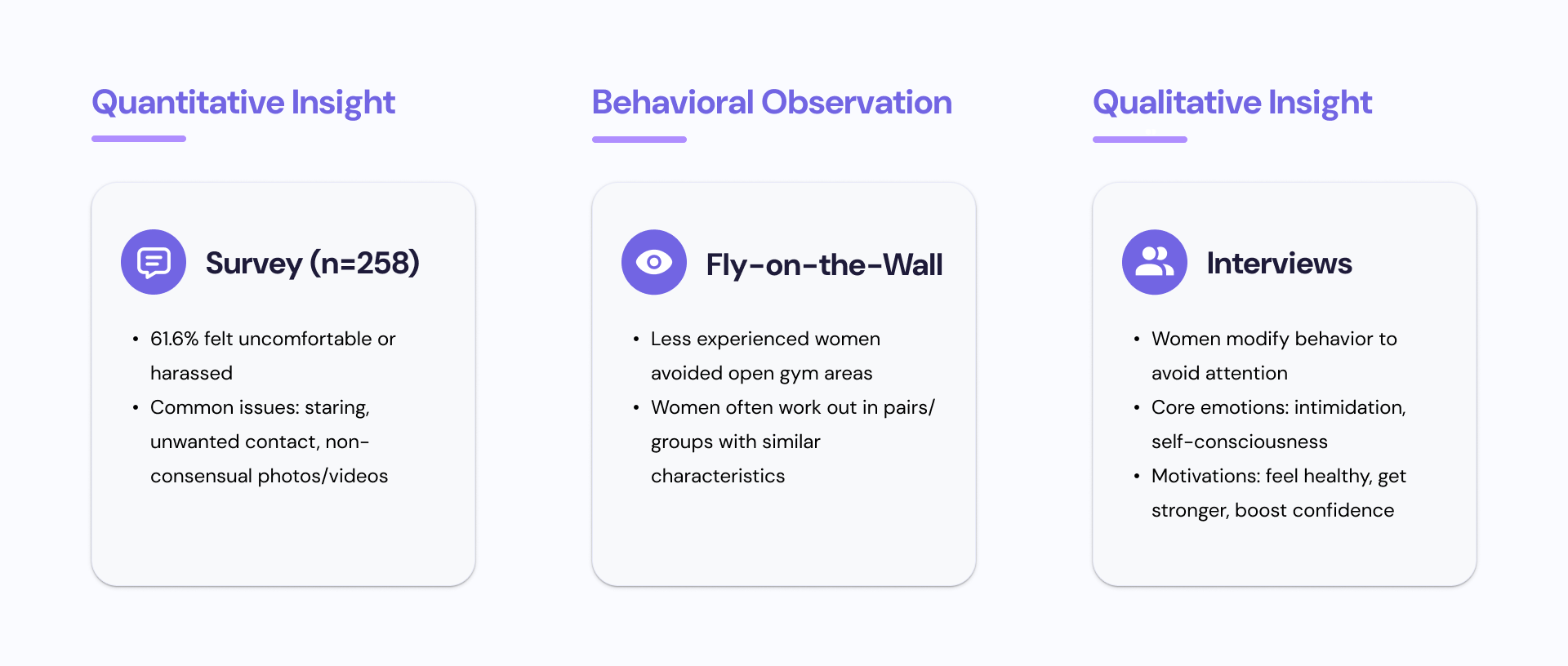
To better understand these challenges, our team combined secondary research with primary research, including surveys, contextual observations, user interviews, and concept testing. These insights guided our design decisions throughout the project.
#1. Survey
A total of 258 women responded to our survey. Survey respondents reported various forms of harassment and discomfort.
Q: What forms of discomfort do women experience at gyms?
A: The most common sources of discomfort were being stared at, repeated requests for phone numbers, and having photos/videos taken without permission.

#2. Fly on the Wall
Independent observations were conducted by three people in four different spaces within the Intramural Activities Building at the University of Washington between 9:30 am to 12:30 pm on a Friday. The researchers worked out in each of the spaces and took notes on their phones in between exercise sets to avoid being conspicuous and biasing the participants in any way.
From the observation, the team found that women tended to work out together in groups consisting of 2 or more people and they were similar in racial background, dress style, physical capabilities, and body sizes.
Q: How do behaviors and interactions vary with respect to gender within gym spaces?
A: Women tend to work together with friends.

#3. User Interviews
Our participants were five gym-going women between the ages of 18-35 chosen based on their responses to the screening survey. We also conducted a stakeholder interview with a local gym owner in Seattle. Notes from the interviews were analyzed using affinity mapping, and helped breathe life into our personas.
Q: Why do women change their behaviors at gyms?
A: Women change their behaviors to avoid attracting attention. They change their body language, workout schedule, exercise posture, and clothes.
User Persona
Based on the insights and findings, we created a persona to gain alignment and guide our future design decisions.

*Click image to enlarge
Ideation
Based on research insights, we moved on to ideate possible solutions.

We synthesized our research findings and explored three potential solution directions to address the barriers women face in gym environments.
Storyboarding Key User Journeys
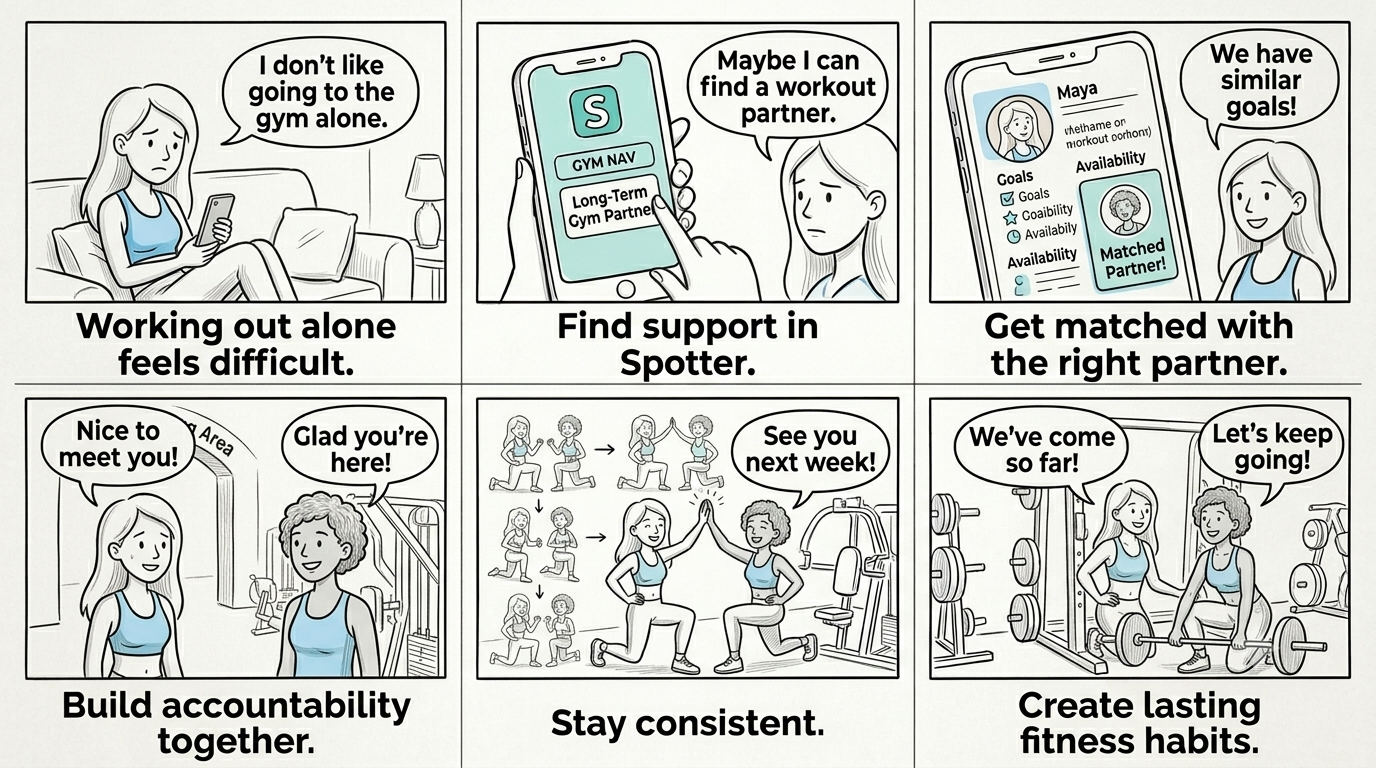
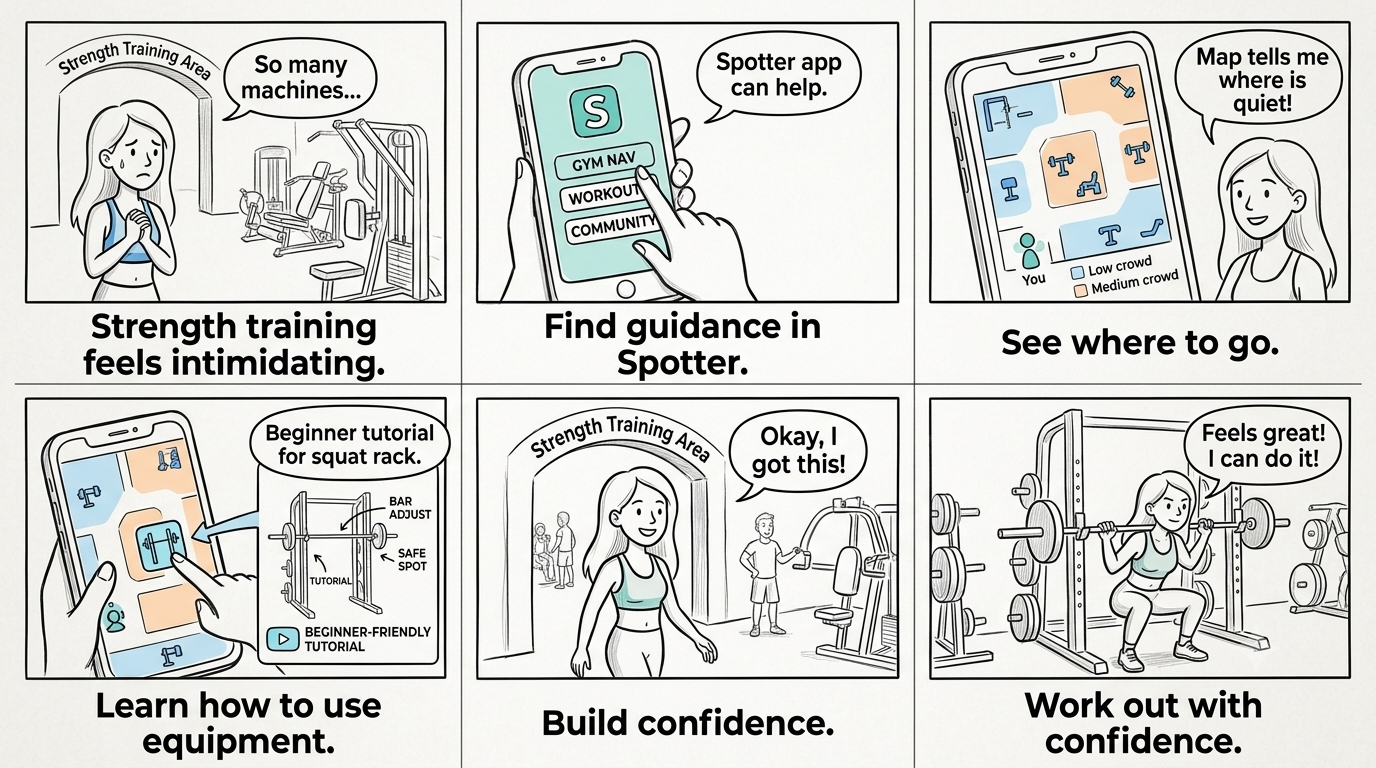
We created two storyboards to explore common barriers women face at the gym.
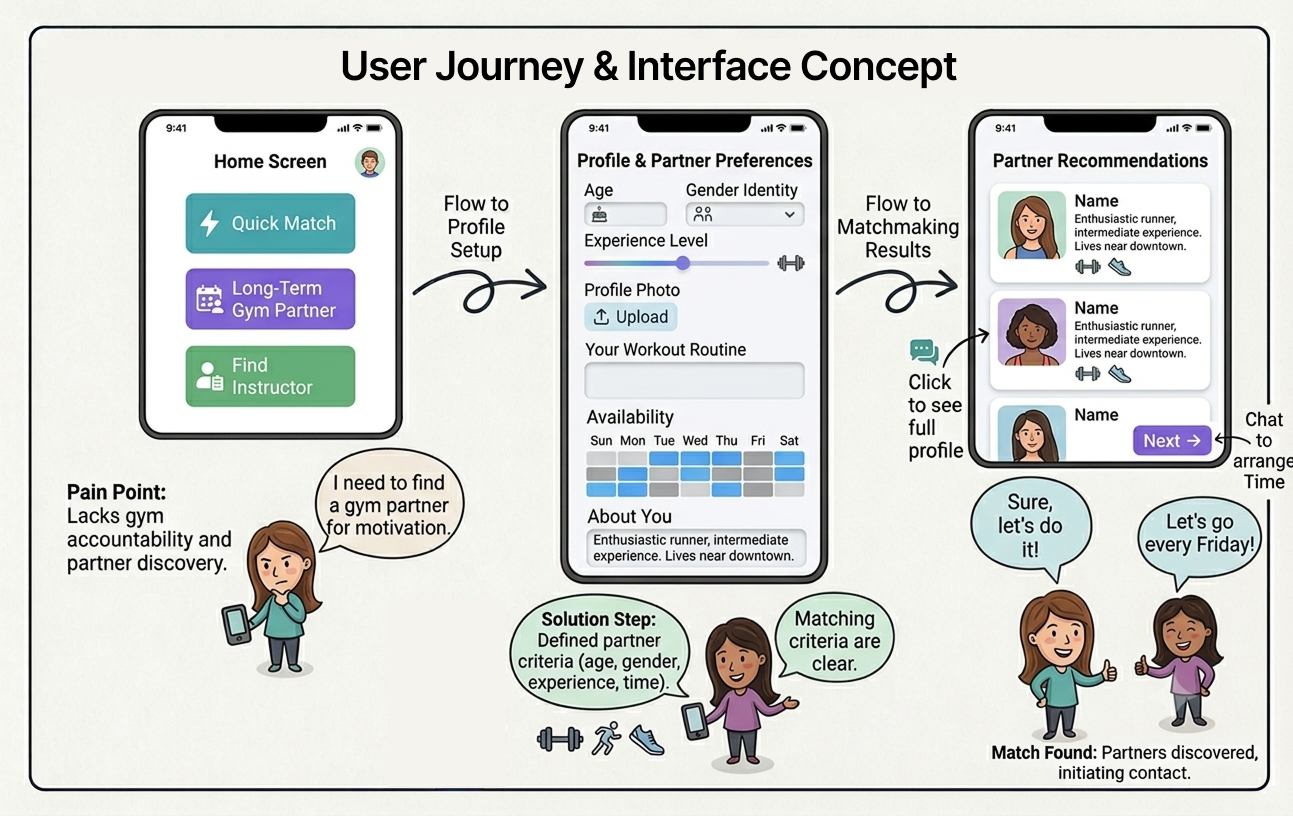
These scenarios informed two core Spotter experiences: building accountability through long-term workout partnerships and increasing confidence through gym navigation and equipment guidance.
#1. Finding Accountability Through Long-Term Workout Partnerships
#2. Building Confidence Through Gym Navigation and Equipment Guidance
user flow
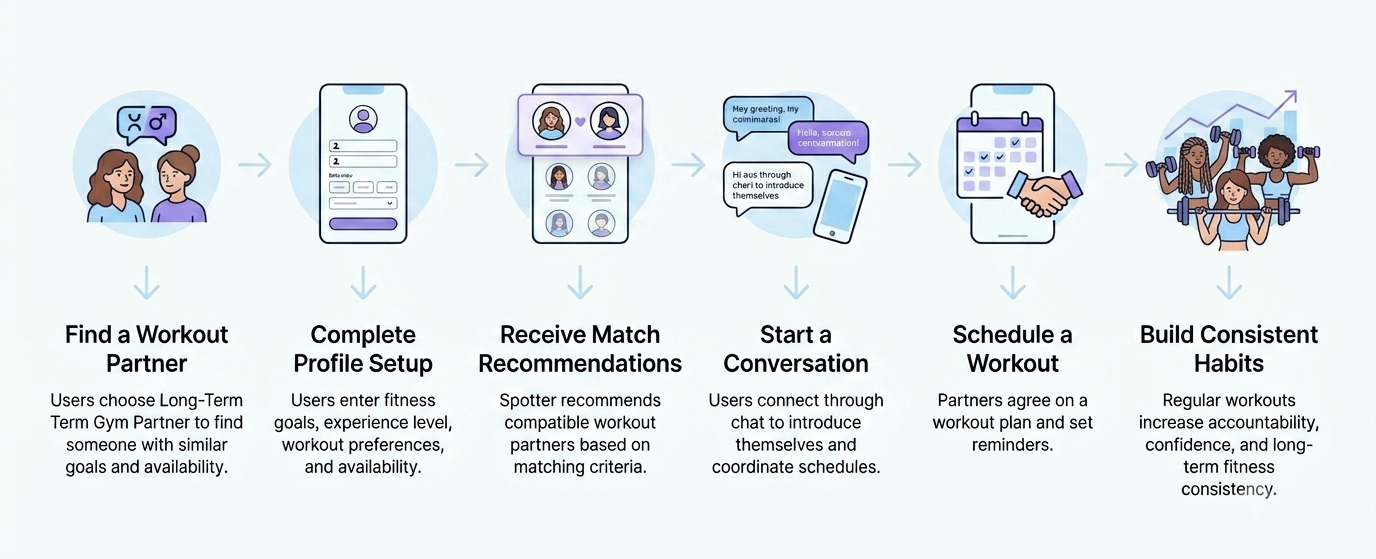
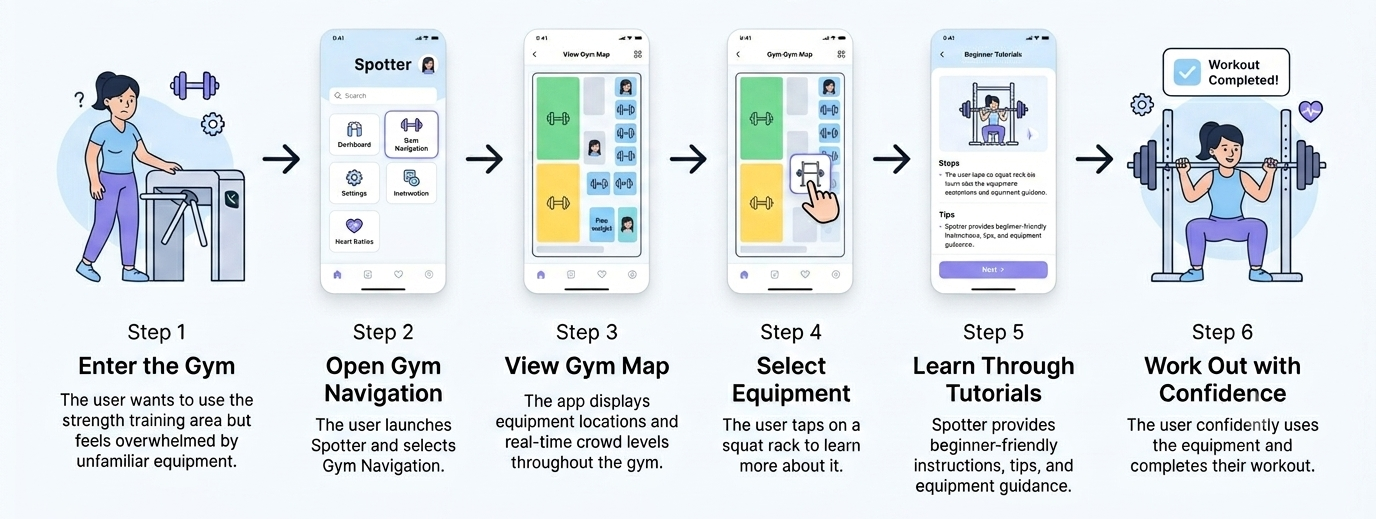
To better understand the user experience, we mapped the key flows for two core Spotter features: long-term partner matching and gym navigation with equipment guidance
Core User Flow #1. Long-Term Partner Matching
Core User Flow #2. Gym Navigation & Equipment Guidance
Starting the design
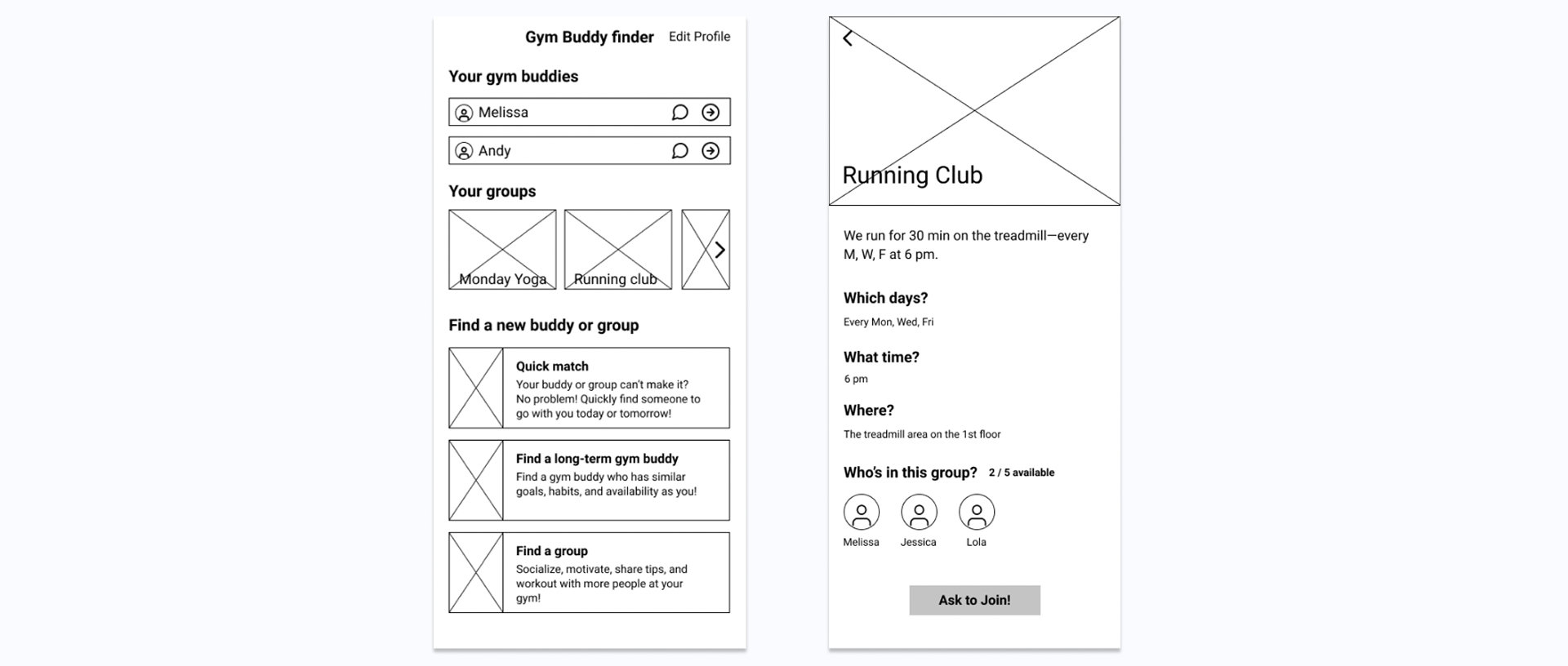
digital Wireframes
As part of the team project, I led the design of the group discovery experience. These wireframes explored how users could find workout partners, join fitness communities, and stay accountable through shared fitness goals.
Mid-fidelity Prototype
We developed a mid-fidelity prototype to evaluate the core Spotter experience, including partner matching, community engagement, messaging, and gym navigation. This prototype allowed us to validate key workflows and gather early usability feedback before moving into high-fidelity design.

Usability Testing
Usability tests were conducted with three female-identifying students who had access to the IMA building at the University of Washington. We used the severity rating scale described below to help us prioritize and fix usability problems.

Refining the design
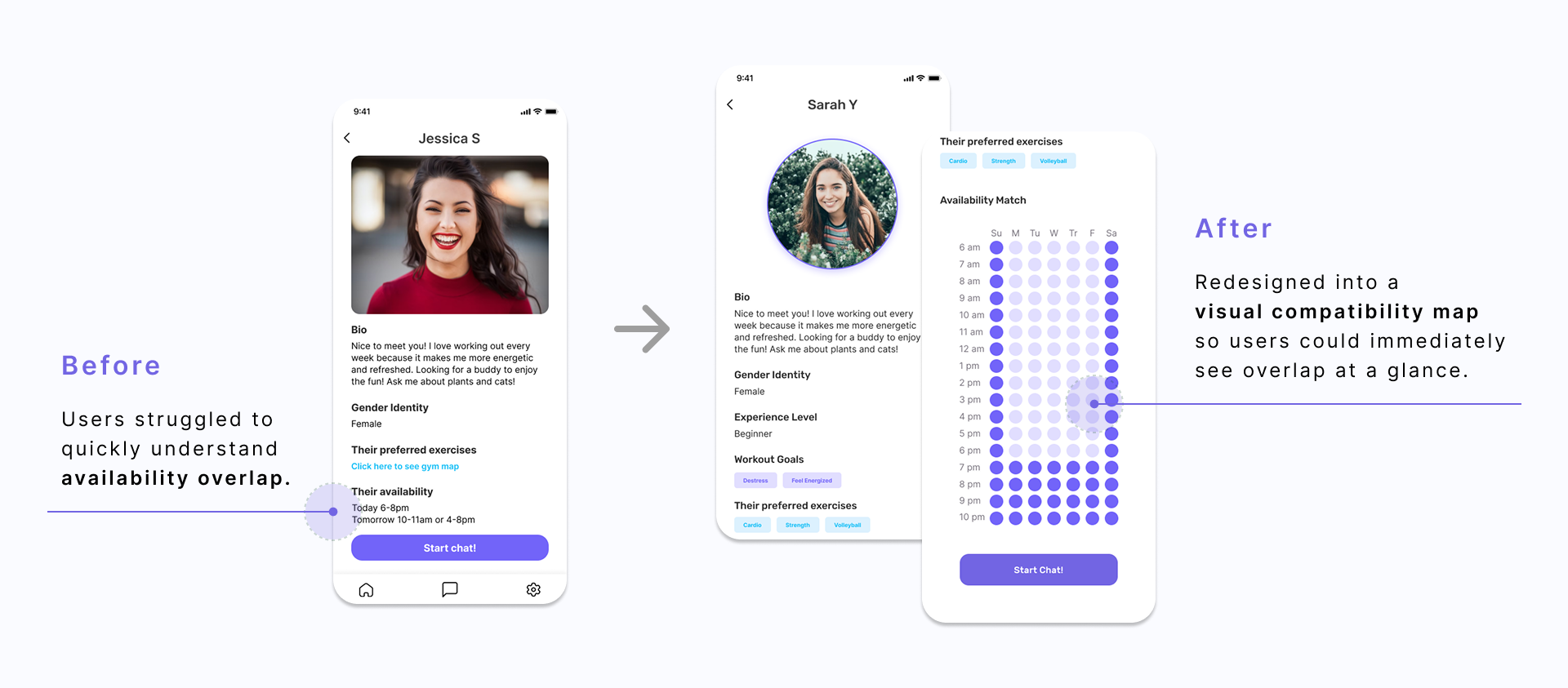
Issue #1. availability hard to see at a glance
2 out of 3 of our users wanted a better way to visualize how their availability matched with their potential partners. The team worked on how to make the information easily scannable.
*Click image to enlarge
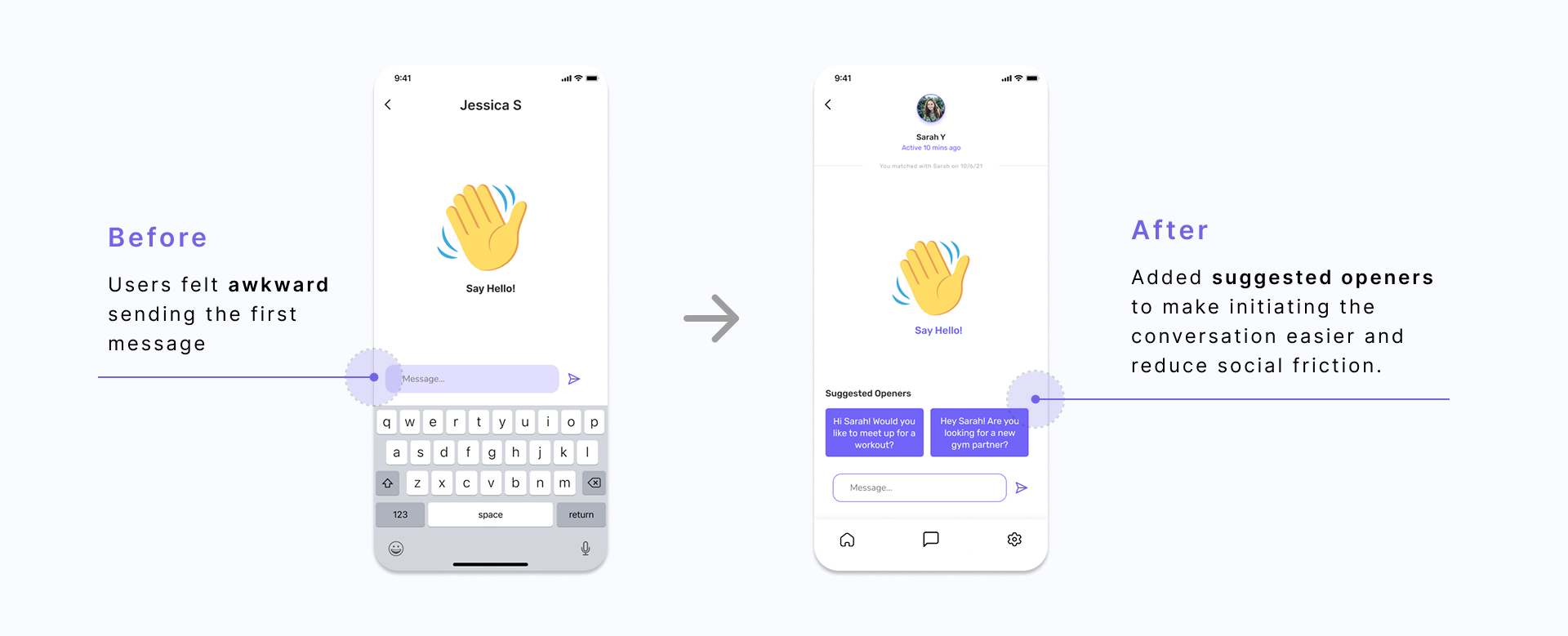
Issue #2. awkward first message
All participants found sending the first text to a potential partner to be awkward. We redesigned to make a streamlined system for sending a request to join.
*Click image to enlarge
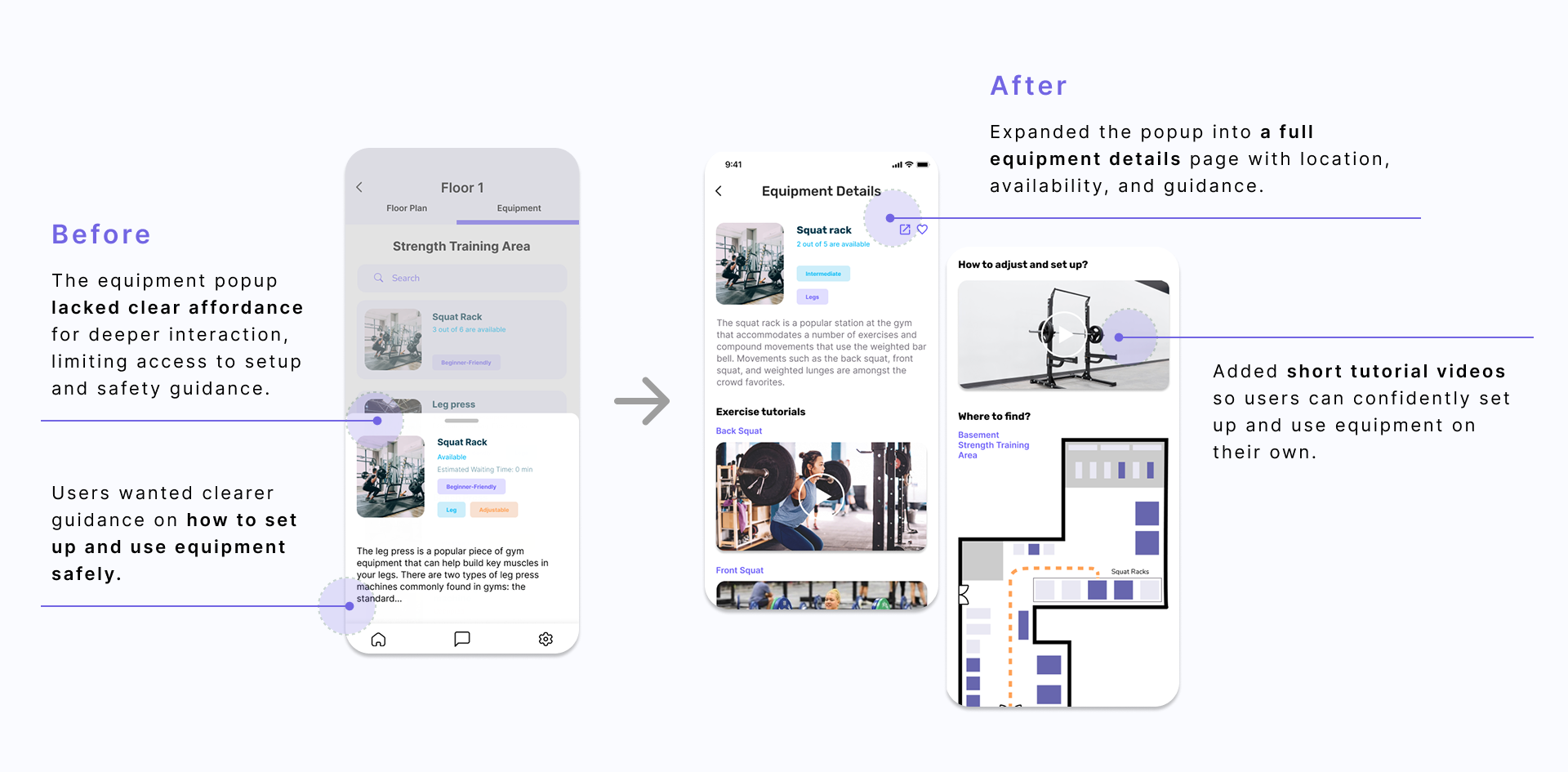
Issue #3. equipment details page were hidden
2 of the 3 participants found the drag interaction to view the entire equipment details page confusing. We changed the draggable pop-up window to a separate page to make contents easily discoverable.
*Click image to enlarge
the solution
High-Fidelity Prototype
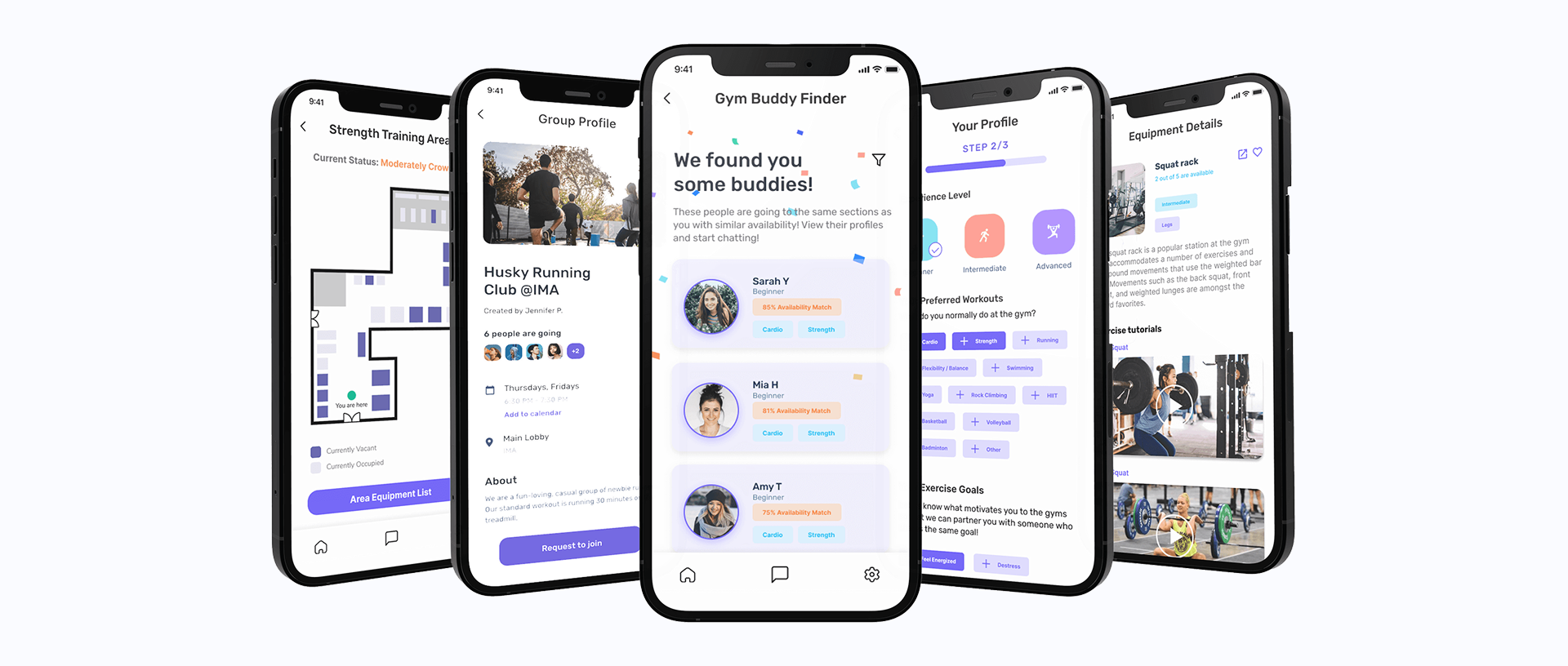
Incorporating insights from usability testing, we refined the experience and developed our final design solution.
Click here to interact with the prototype!
*Click image to enlarge
design system
We created a visual style guide to increase the fidelity of our prototype.

The impact
Solution Validation
We validated our solution with potential users and a local gym owner.
what we heard
✅ Users wanted an easier way to meet other women at the gym.
✅ Having a workout partner made the gym feel less intimidating.
✅ The local gym owner believed the concept could strengthen community engagement.
Design implication
These findings reinforced our decision to prioritize partner matching as Spotter's primary feature.
reflection
what we learned
1. Biggest design lesson: Always ask users
After the ideation phase, we had so many great ideas. They were all our treasured ideas, and we couldn't decide which idea was the best one to pursue within our limited time frames. So the team decided to do a casual concept testing with potential users and asked what they thought about our ideas. Users had an answer to the question we could not solve ourselves. And we were able to redefine our project scope.
2. What I'd do differently: Be specific about the project scope
Although our team’s broad scope at the beginning helped us generate lots of ideas, it became confusing and overwhelming as we moved into prototyping. If we were to do it differently, we would have defined our project scope and core features earlier in order to use our limited time more efficiently.
next steps
1. Conduct another round of usability studies
If we had more time, we would have conducted one more round of usability studies to see if the changes we made after our first usability testing were effective.
2. Build on the secondary features of the app
We found that during the usability testing, participants seemed to be interested in the features associated with navigating the gym spaces. The time constraint allowed us to mainly focus on the buddy feature.
